TP-Link Powerline: extending Wi-Fi over electrical wiring
Written by ISP Integration editorial teamCategory: NEWS
Published:
Thick walls, several floors, hard-to-reach areas… What is stopping you from having a good Wi-Fi connection at home?
We are in the age of connectivity and there is still a battle to improve Wi-Fi connections, above all because we have so many devices connected at the same time: mobile phones, smart TVs, tablets, computers, games consoles and smart devices. Our Wi-Fi experience can be improved; the problem sometimes lies in choosing the most suitable product for each case.
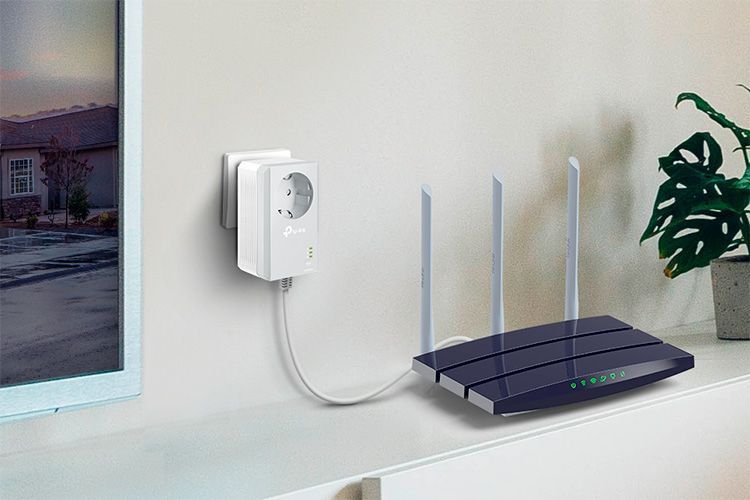
Powerline or PLC technology (Power Line Communications) from TP-Link aims to extend internet access by using the existing electrical wiring to carry data. What does this mean? That installation requires no additional cables: all you need is a power socket.
To set up a basic Powerline network, at least two adapters are needed: one acts as the transmitter and the other or others as receivers
The first is plugged into the socket next to the router and linked to it, sending the signal through the electrical wiring. The others are plugged in wherever we want to extend coverage, so that they receive the information sent by the first adapter and extract the data it carries.
Powerline technology is not new; it meets very specific internet connection/access needs, and to make sure it works optimally there are a few considerations to bear in mind:
- Electrical installation: As the signal is transmitted over the mains, the electrical installation between the floors of your home must be the same. It is also important to bear in mind that the wiring should not be very old and must work properly, as it will be the communication channel for the devices.
- Speeds: PLC adapters follow the HomePlug AV/AV2 standard, which defines the speeds they can transmit. A HomePlug AV adapter reaches a physical signal speed of up to 600 Mbps; however, if you need more bandwidth you can opt for HomePlug AV2. Depending on the HomePlug AV standard, speed, stability and therefore the user experience may vary.
- Plug-and-play: This refers to ease of installation, as it requires little more than plugging it in, connecting it to the router's LAN port and connecting the other adapter to the same circuit. It is very important, however, that the connection is made directly to the wall socket; using extension strips in between is not recommended.
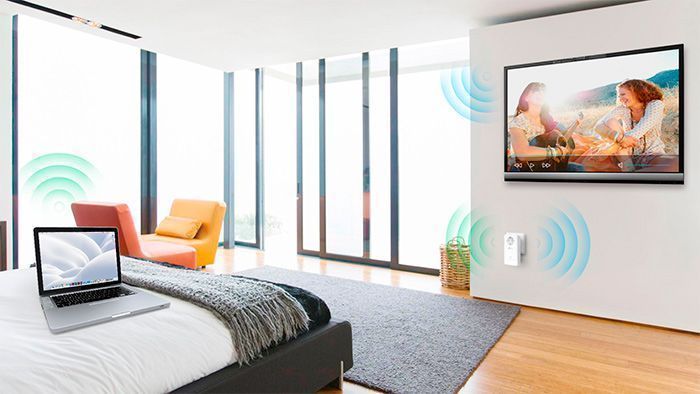
Powerline technology is a quick and easy way to bring data and Wi-Fi access to every corner of your home, eliminating the need to buy expensive cabling or drill unnecessary holes
TP-Link, a global provider of networking devices, accessories and smart home products, offers Powerline devices featuring plug-and-play, automatic Wi-Fi sync and Ethernet ports, delivering connectivity experiences as if you were linked directly to the router.
The flagship TL-WPA8631P KIT , with a built-in pass-through socket so you don't lose a power outlet, is dual-band, has a Wi-Fi clone button and offers ultra-fast powerline transfer speeds of up to 1300 Mbps. It also integrates OneMesh technology which, together with a TP-Link OneMesh router, creates a unified mesh network for even smoother transmission throughout your home.
You may also like
ISE 2027: a working TV studio, AI at work and 1,500 drones

Genelec bolsters its Western Europe team
SOLTEC unveils its RET-G retractable monitors
Neutrik brings TRUE1 and DR Series to JTSE 2026

TBS Education warns of AI bias when hiring staff

Panasonic and HIVE: 80% less AV infrastructure
IDC names Shure a Leader in AI meeting rooms
AVPro Edge MXnet 10G-MSE: 4K and H.265 from one encoder

500 Sony BRAVIA displays connect 100 stores
Sony: the traditional office is falling behind

Datapath to operate under the VITEC brand in 2027
40 giant Sony displays for collaborative learning

OPTIMUS installs 19 SIP intercoms at a Mexican power plant

LEA Cloud diagnoses issues without on-site visits
Genelec equips a music school with 143 loudspeakers

AVIXA appoints Marco Pardi as new chief executive

Spark 2027 to open with Casa Batlló mapping artists
Hikvision Village: a city where it all connects
Barco recreates realistic maritime scenarios

LEDVANCE: free training in LED and smart lighting

Daktronics upgrades video and audio at Lane Stadium
Crestron Collab Engine: meetings and AV control in one

Nureva appoints Ted Shuter as VP, Products
Kramer makes SailPoint's Pune rooms divisible

Pulse brought seven minutes of AV to InfoComm

Sony miniaturises medical imaging with the IMX742
Sony equips Crestron’s centres in London and Paris
ISLE 2027 opens visitor registration in Shenzhen

Nureva brings AI to meeting room management
Hikvision applies thermography to fire prevention
Spark 2027 opens registration and grows at Montjuïc

Ghost meetings under the technological spotlight

Genelec creates a sound forest inside Finlandia Hall
Light + Building strengthens British lighting presence
Bluesound brings licensed music to shops and hotels
Hikvision renews its Madrid Excelente certification
Crestron develops its first proprietary AV chipset
Video Control and Distribution on a Single Platform
Immersive audio and smart rooms: how InfoComm went
Video control and distribution on a single platform
SeeSound equips Cuenca Hospital auditorium

Hikvision Village 2026 recreates a connected city
Curved displays, transparent LED and COB technology

InfoComm América Latina puts AI into practice

Mo Gawdat examines the impact of AI on businesses
IntelliMix Bar Pro takes centre stage in Shure’s strategy

OPTIMUS public address built for maximum demand
Sony equips Crestron's new Experience Centres

AV over IP: When the Network Becomes the System

Captech EXPO Tests Technological Convergence

IFMA Spain: Technology, Spaces and People
Crestron connects more than 200 rooms at Camp Nou
Self-Service Kiosks and AI at InfoComm Latin America
Collaboration, Wireless Audio and AV Management
Sommer hybrid cable for underwater lighting
AVL SUMMIT by AFIAL: Exhibition and Technical Sessions
A Sharp plugin connects Q-SYS with NEC displays
AISpeech and effective listening in meetings