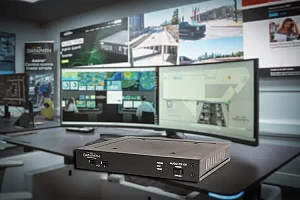










A powerful and flexible multimedia player has been added to the Crestron Construct™ UI editing tool.
For those unfamiliar with the product, the Crestron Construct UI editing tool leverages HTML5 to provide a solution that enables the rapid and easy development of custom, intuitive user interfaces.
Its drag-and-drop WYSIWYG design functionality simplifies deployment and allows consistent interface designs to be delivered to Crestron touch screens across an entire organization, regardless of size or orientation.
The results it has been delivering have been excellent, as demonstrated when Crestron announced the winner of the Crestron Construct UI Design Contest. Polish firm Bestau took top honours with a design that is easily customizable for a wide variety of clients.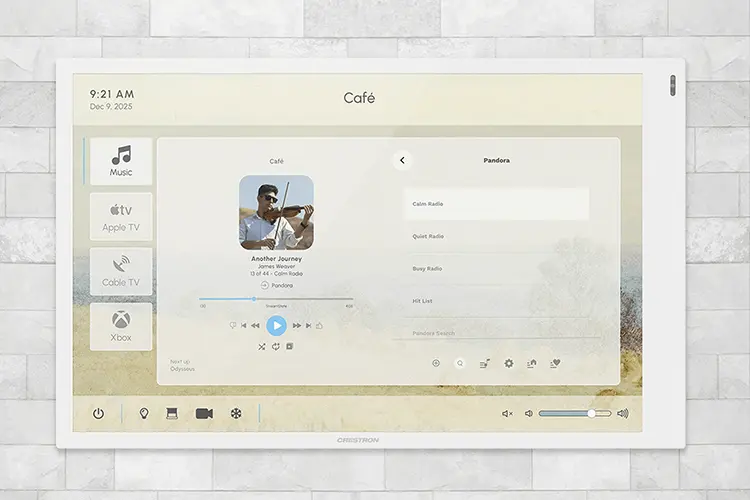
The latest addition: a multimedia player
Tomasz Pajak, CEO of the winning firm, sums up the impact the Crestron Construct UI editing tool has had:
Creating and implementing this solution with the Crestron Construct UI editing tool took us about two days. A custom HTML design from scratch would have taken two or three times longer. It was the first time we had used the tool, and what we achieved, in my opinion, demonstrates both the talent of our team and the ease of use and quality of this Crestron solution, says Pajak, whose firm works on projects ranging from corporate environments to superyacht integrations.
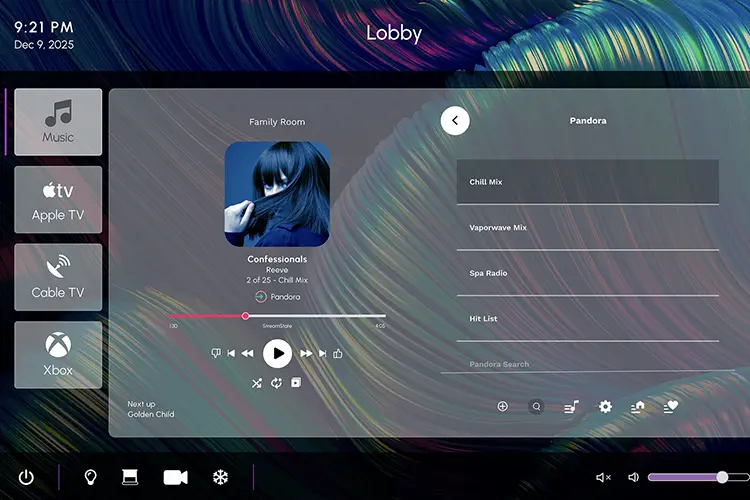
And the quality Pajak refers to has just received a significant upgrade: the tool has been updated with a powerful new component, a multimedia player that allows integrators to easily incorporate music audio control into Crestron Construct projects with minimal programming.
Key features of the Crestron Construct Media Player
- The ease of the Crestron Construct tool: the media player is now available within Crestron’s go-to platform for building HTML5-based user interfaces, designed to streamline workflows and equip integrators with modern tools and components.
- A wide range of solutions: the new media player component enables integrators to easily integrate music audio control into Crestron Construct UI projects with minimal programming, while also supporting leading audio solution partners (Crestron DM NAX® Audio-over-IP technology, Autonomic, Bluesound, and Sonos).
- A seamless audio experience for end users: end users benefit from intuitive and responsive music control from their playback devices, across multiple zones and sources, delivered through a sleek, embedded interface.
- Parity with VT Pro-e® software: with the addition of the media player, Crestron Construct continues to support the essential components of VT Pro-e software, making it easier than ever for integrators to migrate and modernize their projects.
The evolution to HTML5
As Crestron noted when the tool was introduced in 2023: “Over the years, we have provided our design community with an ever-evolving series of tools to help them create the most intuitive and efficient user interfaces on Crestron touch screens. In the past, this included Crestron VisionTools® software, Crestron VisionTools® for Windows®, and VT Pro-e® software. The pace of technological advancement behind that software led Crestron to develop its original SmarTouch™ touch panel, followed by Isys, the Synapse™ image rendering algorithm, and more recently, Smart Graphics® software”.
As a result, Crestron transitioned its user interfaces to the new industry standard: HTML5.
We know that for integrators moving from VT Pro-e software, having the right components in Crestron Construct is critical. The media player was one of the last key components missing from our library until now, comments Ara Seferian, Senior Product Manager of Cloud and Control Services at Crestron.
Commercial use cases
The media player within the Crestron Construct tool opens up a wide range of potential applications, including (but not limited to):
Corporate offices
- Lobbies: background music to create a welcoming atmosphere
- Break rooms: relaxing playlists to boost morale
- Training rooms: audio for onboarding and instructions
Education
- Classrooms: audio lessons and music appreciation
- Libraries: ambient or educational sound
- Kiosks and hallways: school announcements
Healthcare
- Waiting rooms: calming music to help reduce stress
- Therapy rooms: guided meditation and soundscapes
- Staff lounges: music for relaxation
Retail and hospitality
- Stores and hotel lobbies: music aligned with the brand
- Service areas: audio for guidance and promotions
- Bars and restaurants: creating the perfect ambience
The media player
“We have developed and published a media player API that several partners have already successfully integrated into their devices”, explains Seferian. “This component makes it easy to control those devices — simply drop it into the project, connect a few signals within the control system program, and it’s ready to communicate with the media player”.
The Crestron Construct media player is a feature-rich component that simplifies audio control in any environment. “You can switch sources from your SIMPL Windows program or even SIMPL Sharp Pro, and you can also program in C#. Regardless of the platform you are using, you can communicate with different hardware devices that have implemented our API”.
In addition to its easy integration with a wide range of audio solutions, the media player is a natural fit for Crestron DM NAX Audio-over-IP systems.
This new component is one of three major updates and enhancements the tool has received since its release, with more features on the way.
We are always improving the product, and as we receive feedback, we will continue to meet the needs of our integrators and markets. With that in mind, keep an eye out for version two of this media player, expected sometime next year, concludes Seferian.